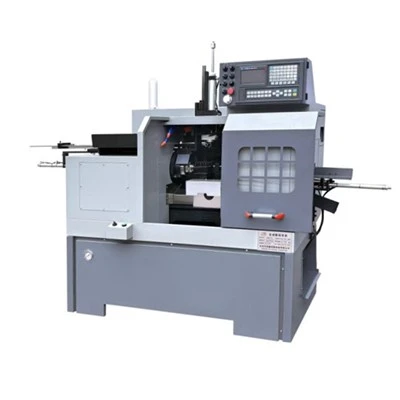
Hey everyone, it’s Jake here—part of the team that’s been supplying CNC lathes for over a decade, and I get asked this question at least once a week: “How do I fix backlash in my CNC lathe?” If you’re a machinist, owner-operator, or even a new shop floor tech, you’ve probably felt that annoying, jerky delay when you reverse the axis on your lathe. That’s backlash, and trust me, it’s the silent killer of precision parts, especially if you’re running anything tight—like medical components, small aerospace fittings, or even custom car parts that need perfect fits. CNC Lathe

I’ve seen shops throw parts away because of backlash, waste hours reworking setups, and even replace entire axes before realizing it was just a simple adjustment. Backlash isn’t a death sentence for your machine, and it doesn’t always mean you need a brand-new lathe. Let’s break this down like we would in our service bay—no jargon, no confusing textbook terms, just real, actionable fixes I’ve tested on everything from our entry-level benchtop lathes to heavy-duty industrial models.
First, let’s keep this basic: what is backlash, anyway? It’s the tiny, unwanted gap between the moving parts in your lathe’s axis system—usually the leadscrew and nut, or the gear teeth in the gearbox. When you reverse the direction the axis is moving, that gap has to close before the axis actually moves. That delay or jerk is backlash. A little is normal, but too much? It’s garbage in, garbage out for your parts.
Now, before we jump into adjustments, let’s do a quick pre-check to make sure backlash is actually the problem (and not something way simpler). I’ve caught new operators blaming backlash for a loose workholding chuck or a worn cutting tool more times than I can count. Here’s my go-to quick test:
- Jog your X or Z axis 10mm in one direction, hold the jog button steady, and zero the position display on your CNC controller.
- Now jog the axis 10mm in the opposite direction, slowly—you’ll see the display sit there before it starts moving again. The number it sits on before moving is your backlash gap.
- If that number is more than 0.02mm (for precision parts) or 0.1mm for general work, that’s your problem. But if when you jog backwards, the axis moves smoothly with no delay, check your chuck tightness first. It sounds silly, but I’ve had a shop throw away a $500 aluminum billet because their chuck was loose and they thought backlash was to blame.
Okay, now we know it’s backlash. Let’s get to the fixes, ordered from easiest, cheapest (and most common) to the more involved stuff. This works on most CNC lathes, regardless of brand, though we’ll throw in a few tips specific to the machines we supply, since that’s what we work on every day.
1. Adjust the Leadscrew Nut (The Most Common Fix)
9 times out of 10, excess backlash comes from a worn or improperly adjusted leadscrew nut. Your lathe has one of two types here: a single-piece nut or a split (double) nut. Split nuts are way easier to adjust, which is why we put them on our mid-range lathes—less hassle for our customers, less service calls for us.
First, safety: always turn off the power and disconnect the air supply (if your machine has air brakes) before working on axis parts. I’ve seen a guy almost lose a finger because he forgot to kill the power and hit the jog button by accident.
- Split Nut Adjustment: Look for two set screws on the nut housing (usually on the bottom or side of the carriage, where the nut meets the leadscrew). Loosen the lock nut first, then turn the adjuster screw (usually a small hex head) a quarter to a half turn clockwise. What this does is push one half of the split nut into the leadscrew, closing the gap between the nut and the screw’s threads.
- Now, re-run that backlash test I mentioned earlier. If it’s still too high, add another quarter turn. But don’t overdo it—if you push the nut too tight, you’ll put excess friction on the leadscrew, cause premature wear, and make your axis jog hard. You want it tight enough to eliminate the gap, but smooth when you jog the axis by hand (with power off, obviously).
- Single Nut Adjustment: A little trickier, because these don’t split. Some single nuts have an eccentric collar that adjusts the nut’s position relative to the leadscrew—loosen the collar’s lock bolt, turn the collar slightly, then retighten. Others use shims between the nut and carriage; you can thin or thicken the shims to adjust the gap. If your machine has a single nut and it’s still giving you trouble after adjustment, it might be time for a replacement—we stock leadscrew nuts for all the lathes we sell, so it’s a quick, cheap part.
2. Tighten or Replace Worn Gear Train Components
If your lathe has a gear-driven axis (not a direct-drive or belt-driven system), backlash can come from worn gear teeth, loose set screws on the gear shafts, or worn pinions. This is more common on older lathes, or ones that run 24/7 in high-volume shops.
- Start with the basics: check all set screws on the gear shafts, especially the ones connecting the lead screw shaft to the motor or gearbox. Loose set screws mean the gear can slip on the shaft, creating a gap that causes backlash. Just loosen the set screw, realign the gear with the shaft, and tighten it back down—use loctite if you run heavy cuts to keep it from coming loose.
- Next, inspect the gear teeth. If you see chipped, worn, or rounded teeth, that’s the problem. Gears don’t cost a ton, and replacing them is straightforward. I recommend replacing both the pinion and the mating gear at the same time, because one worn gear will wear the other out faster. We keep a full stock of gear kits for our lathes, so most shops can do this in an afternoon.
3. Belt Tension Adjustment (For Belt-Drive Axis Systems)
A lot of our entry-level CNC lathes use belt drives for the axis motors—they’re quieter, cheaper, and easier to maintain than direct drives. But if your belt is loose, it will slip between the motor pulley and the axis gear, creating a huge amount of backlash. This is such a simple fix, but so many people miss it.
- To check: jog the axis 50mm, then hold the carriage tight and try to move it back by hand. If it moves more than 1-2mm without the controller registering movement, your belt is slipping.
- Adjustment is easy: most belt-driven axis systems have two bolts that mount the motor to the carriage. Loosen those bolts, slide the motor away from the carriage a little (don’t go too far, you don’t want to stretch the belt), then retighten the bolts. How tight should it be? Press down on the belt halfway between the two pulleys—you should only be able to move it 5-10mm. If it’s loose, add a little more tension; if it’s tight enough that you can barely move it, you’ll wear the belt out fast.
- Pro tip: if your belt is cracked, frayed, or shiny (that means it’s glazed from use), replace it. It’s like a timing belt on a car—you don’t wait for it to snap before you swap it. We sell replacement belts for all our lathes, and it’s a 10-minute job.
4. Ball Screw Preload (For Industrial/High-Precision Lathes)
If you’re running a high-volume shop or making parts with super tight tolerances, you probably have a ball screw on your lathe. Ball screws are way more efficient than leadscrews, but they can develop backlash over time too. Most modern ball screw systems have a preload adjustment built in to compensate for wear—this is one of the first things we adjust when we set up a new lathe for a customer, but it needs rechecking if you see backlash.
- Preload works by pushing two nuts on the ball screw against each other, so there’s no gap between the nut and the screw’s ball bearings. The adjustment is usually done with spacers between the nuts, or a pair of adjuster nuts that you turn to create the preload.
- This is a little more involved than the other fixes, so if you’re not comfortable working with precision ball screws, call your service team (or us, if you bought your lathe from us). Mismatched preload can cause excess friction or even damage the ball screw if you get it wrong.
Common Mistakes to Avoid
I’ve made all of these, so trust me when I say these will save you time and money:
- Over-adjusting the leadscrew/nut: I once tightened a split nut so tight on a customer’s lathe that they burned out the axis motor in a week because it was working too hard. Start small, test often.
- Ignoring lubrication: Dried-out leadscrews or ball screws cause extra friction and wear, which leads to backlash. We recommend our customers grease or oil the leadscrew every 100 hours of operation—most lathes have a lubrication port right on the carriage. Don’t skip this, it’s free prevention.
- Using the wrong tools: Always use a hex wrench or torque wrench for adjustments, not a pair of pliers. Stripping a set screw or nut makes a simple fix turn into a whole project.
- Forgetting to home the machine after adjustments: Every time you adjust backlash, you need to re-home the axis on your controller. If you skip this, the CNC doesn’t know the new position, so you’ll still get bad part quality.
Now, let’s talk about when it’s time to step in and get professional help, or when backlash is actually a sign of a bigger problem. If you’ve tried all these fixes and you’re still getting more than 0.05mm of backlash, it might mean your leadscrew has worn threads, or the linear rails on your lathe’s carriage are worn. Linear rails are super durable, but if a shop runs heavy cuts with loose workholding, the rails can get galled, which causes play. That’s a bigger fix, but it’s not the end of the machine—we’ve replaced rails on lathes that were 10 years old, and they run like new.
At the end of the day, most backlash issues are fixable without buying a new CNC lathe. We’ve had customers call us panicking because they thought their $30k lathe was shot, and we talked them through adjusting the belt or the leadscrew over the phone, and they had it fixed in 15 minutes. That’s why we love what we do—helping people get their machines running right, no expensive replacements necessary.
Gantry Machining Center If you’re dealing with persistent backlash, or you just want to make sure your lathe is set up correctly to avoid this issue down the line, feel free to reach out to our team for a chat. Whether you need help walking through an adjustment over the phone, want to order replacement parts, or are looking for a new CNC lathe that comes with a 1-year warranty and lifetime support, we’re here to help. Don’t let backlash slow you down or ruin your parts—let’s get your lathe running perfect again.
References
- Oberg, E., Jones, F. D., Horton, H. L., & Ryffel, H. H. (2020). Machinery’s Handbook (31st ed.). Industrial Press Inc.
- Smid, P. (2008). CNC Programming Handbook (2nd ed.). Industrial Press Inc.
- American Machinist. (2021). "Understanding and Fixing CNC Lathe Backlash." American Machinist, Vol. 165, No. 4, pp. 28-32.
- Design World. (2019). "Ball Screw Preload: What It Is and How to Adjust It for Precision." Design World, Vol. 33, No. 9, pp. 41-44.
Taizhou Qiyang Trading Co., Ltd.
As one of the most professional CNC lathe manufacturers and suppliers in China, we’re featured by quality products and good price. Please rest assured to buy bulk CNC lathe for sale here and get quotation from our factory. Customized orders are welcome.
Address: Zhenhai Village, Binhai Town, Wenling City, Taizhou City, Zhejiang Province
E-mail: qycncmachine@outlook.com
WebSite: https://www.qycncmachine.com/
