As a flatbed printer supplier who’s worked closely with small business owners, sign shops, and manufacturing teams over the past seven years, I’ve seen too many operators write off their printers as “flawed” when the real issue is simple: consistent, proactive maintenance. Flatbed printers are workhorses—they can run 10+ hours a day on vinyl, acrylic, wood, metal, and even fabric—but like any tool designed for precision, they stop performing if you skip the small, regular checks. Flatbed Printer
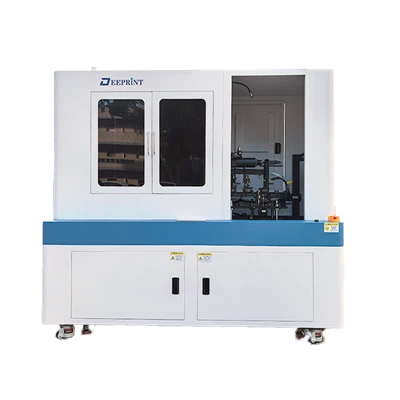
I’m not talking about overcomplicated tech jargon here. This guide is built on lessons I’ve learned from troubleshooting clients, testing maintenance routines in our own demo center, and listening to the team of technicians who support our line of flatbed printers. Whether you’re running a 24×36 desktop model for a local print shop or a 6×10 industrial unit for a production facility, these steps will extend your printer’s lifespan, cut down on costly downtime, and keep your prints sharp enough to win repeat clients.
Let’s start with the core: why maintenance matters. I’ve had clients come to us with printers that were just three years old, with print heads that were nozzling out blurry, faded lines—totally preventable. When you spend $10k to $100k on a flatbed printer, skimping on maintenance is like skipping oil changes on a new semi-truck. It might run for a while, but the second something breaks, you’re looking at tens of thousands in repairs and weeks of lost revenue. I’ve also seen clients boost their printer’s output by 20% just by adjusting a few routine habits—no new parts needed.
Now, let’s break this down into daily, weekly, monthly, and quarterly tasks, because consistency beats overhauls.
Daily: Small Habits That Prevent Big Problems
Most of these take less than 10 minutes, and skipping them is the top reason we get emergency service calls.
First, always wipe the print head after every shift. This isn’t the fancy cleaning a technician does—this is a quick, gentle wipe to remove ink residue that dries and clogs nozzles. Use a lint-free microfiber cloth (never paper towels, they leave tiny fibers that scratch the head) dampened with a manufacturer-approved cleaning solution. Avoid rubbing hard—light, side-to-side swipes across the print head surface do the trick. I’ve seen clients use rubbing alcohol, which is fine, but make sure it’s 90%+ isopropyl; 70% has too much water and can cause residual buildup over time.
Next, check the waste ink pad level. The waste pad catches excess ink that doesn’t get used during flushing or print head tests. Most printers have a digital alert when the pad is 80% full, but if yours doesn’t, a quick peek through the access panel (after unplugging, for safety) will show you how much ink is absorbed there. If it’s too full, ink can leak onto your bed or inside the machine, ruining prints and causing electrical issues. For our clients, we set up automated reminders for this, but even a quick check at the end of the day works.
Third, clear debris from the printer bed and the area around the carriage. Small bits of vinyl, wood splinters, or dust can get stuck under the media clamp or on the print bed. These don’t just ruin the current print—they can scratch the bed, which makes future prints shift. I once had a client who skipped this step and ended up with a $500 scratch on a 4×8 bed, because a tiny piece of sticker paper got caught under the clamp and dragged across the surface. A quick sweep with a soft bristle brush or a compressed air canister (held at least 6 inches away, so you don’t blow debris into the print head) takes care of this.
Finally, run a nozzle check before starting any production run. Most printers have a built-in test pattern that shows if any nozzles are clogged. If a few are off, a quick 2-minute head flush usually fixes it. If a whole line is missing, that’s a sign you need a deeper clean, not an emergency service call. I always tell our clients: never start a big job (like a batch of 50 signs for a local business) without this check. It’s saved more jobs than I can count.
Weekly: Deeper Checks That Keep Parts Working
These tasks take 15 to 30 minutes, and they address parts that wear out slowly but cause big issues when they fail.
Start with the carriage rails. The carriage (the part that holds the print head) glides along two metal rails, and if those rails are dusty or dry, the carriage can stick, causing blurry prints or missed lines. Once a week, wipe the rails with a clean microfiber cloth to remove dust and ink buildup, then apply a thin layer of silicone-based lubricant (never oil, which attracts dust and causes buildup) specifically designed for printer rails. I recommend the same lubricant we use for our printers—cheap automotive grease or WD-40 is too thin and can seep into the print head area. Wipe off any excess lubricant, because too much can drip onto the media.
Next, inspect the media clamps. The clamps hold your material in place, and if they’re worn or loose, your media can shift mid-print, ruining a whole run of expensive materials (like premium acrylic or aluminum). Tighten any loose screws on the clamps, and check for cracks or frayed rubber pads—if the pads are worn, they won’t grip flat material properly. We stock replacement clamp pads for all our models, and they’re easy to install in 5 minutes.
Also, clean the interior air filter. Flatbed printers need proper ventilation to prevent overheating, especially when running long jobs. Most models have a filter on the back or side that traps dust. If the filter is clogged, the printer overheats, which can shorten the lifespan of the print head and other electronics. Vacuum the filter gently (or rinse it with water if it’s reusable) once a week, depending on your environment. If you’re printing in a dusty workshop, check it every 3 days.
Monthly: Preventive Steps to Avoid Costly Repairs
These tasks take about an hour, and they’re the difference between a printer that lasts 3 years and one that lasts 7+.
First, do a full print head cleaning cycle. A deep clean uses more cleaning solution, but it clears stubborn clogs that daily wipes can’t fix. Follow your printer’s manual—don’t run it more than twice in a row, because excessive cleaning can waste ink and wear out the print head. If the nozzle check still shows missing lines after two cleans, that’s when you contact a technician, not keep running cleans. I’ve seen clients run 5+ cleans a month and end up needing a new print head 18 months early—avoid that.
Second, calibrate the print bed and alignment. Over time, the print bed can shift slightly (especially with heavy industrial units that move a lot) or the carriage can drift, causing prints to be misaligned. Most printers have automatic calibration tools, but I recommend doing this manually once a month for critical jobs. For example, if you’re printing a sign with text that needs to line up perfectly with graphics, a quick alignment check ensures your cuts and prints match up. We include a step-by-step calibration guide for every printer we sell, and our tech team is always available to walk you through it.
Third, inspect all cables and connections. Power cables, data cables (USB or Ethernet), and the ribbon cable that connects the print head to the main board can get frayed or loose over time. A loose cable can cause random shutdowns or corrupted prints. Unplug the printer, check all connections, and look for any signs of wear on the cables. If you see fraying, replace them immediately—don’t risk a fire or a damaged main board.
Finally, test the emergency stop (E-stop) button. This is a safety step that’s easy to skip, but critical. Every month, press the E-stop (usually a red button on the side or front) to make sure it cuts power to the printer immediately. If it doesn’t work, your printer could keep running if something goes wrong, which can cause damage to the bed or media. I’ve had a client where the E-stop failed mid-print, and the carriage ran into a solid aluminum sheet, costing $1,200 in damage. Don’t cut corners here.
Quarterly: Long-Term Maintenance for Industrial Models
If you run an industrial flatbed printer (the 6×10 or larger models), there are a few tasks to do every 3 months that you won’t need for desktop models.
First, replace the waste ink pad. Most industrial models have larger waste pads, and even with daily checks, they can fill up. When the pad is full, ink can leak, so replacing it is a key quarterly task. Our tech team does this for clients who have service contracts, but it’s a straightforward process if you follow the manual.
Second, inspect the drive belts. The drive belt moves the carriage along the rails, and if it’s loose or stretched, it can cause print alignment issues. Tighten the belt according to your manual, and check for cracks or fraying—if the belt is damaged, replace it. This is a $50 part, but a broken belt can stop your printer entirely for days.
Third, deep clean the print bed. Over time, ink, adhesive, and debris build up on the bed, especially if you print with vinyl or sticky materials. Once a quarter, remove the bed cover (if your model has one) and clean it with a gentle, non-abrasive cleaner—avoid harsh chemicals, which can damage the bed’s coating. I recommend using a mixture of warm water and mild dish soap, applied with a soft cloth. Scrub gently to remove tough buildup, then dry thoroughly.
Pro Tips From Our Team of Technicians
After working with hundreds of clients, we’ve picked up a few tricks that don’t make it into the manual.
First, don’t leave your printer idle for more than 3 days. If you don’t use it regularly, ink can dry in the nozzles, leading to clogs. If you need to take a break for a weekend or holiday, run a full nozzle check and a head flush before shutting down. For longer breaks, we recommend capping the print head (with a manufacturer-approved cap) and storing the printer in a cool, dry place.
Second, use high-quality ink and media. This is the biggest mistake new flatbed printer owners make. Cheap ink can have impurities that clog nozzles, and thin media can scratch the bed or cause the clamps to slip. We only use ink formulated for our printers, and we recommend partners for media that’s tested for compatibility. A $20 bottle of cheap ink might save you money upfront, but it can cost you hundreds in repairs later.
Third, keep a maintenance log. Jot down when you did a nozzle check, head flush, or rail lubrication, and note any issues (like a few clogged nozzles) that popped up. This helps you spot patterns—if nozzles clog every Monday, you might need to adjust your room humidity, for example. It also makes it easier to troubleshoot if you need to call for service.
I know this seems like a lot, but most of these steps are quick, and they add up to a printer that runs smoothly for years. I’ve seen clients who follow this routine have their flatbed printers last 8 to 10 years, instead of the average 3 to 5. That’s not just better for your bottom line—it’s better for your business, because you can take on more jobs without worrying about downtime.

At the end of the day, a flatbed printer is only as reliable as the care you put into it. If you’re struggling with current issues, or looking for a new flatbed printer that’s built for easy maintenance, we’re here to help. We’ve worked with businesses of all sizes, from small print shops to large manufacturing facilities, and we can walk you through the best maintenance routine for your model, answer questions about parts, or help you find a printer that fits your needs. Reach out to us to learn more and discuss how we can support your equipment and production goals.
Bottle Printer References
- International Association of Printing House Managers. "Flatbed Printer Preventive Maintenance Guidelines." Printing Management Review, 2022.
- Fujifilm Business Innovation. "Proactive Care for Wide-Format Flatbed Printers." Technical Support Bulletin, 2021.
- Smith, J. "Reducing Downtime in Digital Flatbed Printing Facilities." Journal of Graphic Arts Technology, vol. 14, no. 2, 2023, pp. 45-52.
- Eco-Solvent Technology Association. "Ink Compatibility and Print Head Care for Flatbed Printers." Industry Best Practices Report, 2022.
Shenzhen Deeprint Technology Co., Ltd.
As one of the most professional flatbed printer manufacturers and suppliers in China, we’re featured by quality products and good service. Please rest assured to buy customized flatbed printer made in China here from our factory. Contact us for free sample.
Address: 6-1, Huangwu Road, Tongle Community, Baolong Street, Longgang District, Shenzhen City 518100,China.
E-mail: ellen@uvdprint.com
WebSite: https://www.uvd-print.com/
